
Choosing the right 3D printer can feel overwhelming, especially with so many options available. Among the most popular choices are the Creality Ender 3 and its upgraded sibling, the Creality Ender 3 V3. Both models have earned a reputation for reliability and performance — but when it comes to Ender 3 vs Ender 3 V3, they serve different needs and budgets.
Whether you’re a DIY enthusiast looking to bring creative projects to life or a business owner aiming to streamline production, selecting the best 3D printer for small business is crucial. The right choice can save you time, money, and frustration — while ensuring high‑quality results.
In this guide, we’ll dive into a detailed comparison of the Ender 3 and Ender 3 V3. You’ll discover their key features, differences, and which one suits your specific needs. By the end, you’ll have all the information needed to make an informed decision.
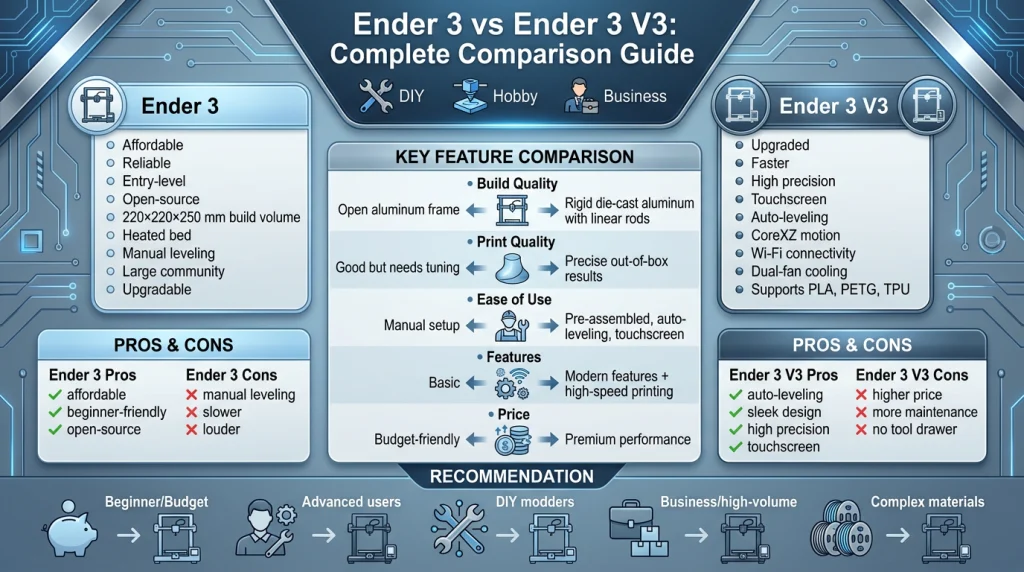
Overview of Ender 3
The Creality Ender 3 debuted in March 2018 and quickly became a game-changer in the 3D printing world. Designed as an affordable, entry-level printer, it offered features typically found in higher-priced models. Its open-source design and ease of use made it a favorite among hobbyists and beginners alike.
For beginners exploring budget-friendly options, the Ender lineup often appears in discussions about the Top 3D Printers Under $300. For example, many users compare it with other entry-level models like the Anycubic Kobra Go to see which offers the best balance of print quality and ease of use.
Key Features and Popularity
The Ender 3 boasts a sturdy aluminum frame and a build volume of 220 x 220 x 250 mm, allowing users to create medium-sized projects. It includes a heated bed, which improves print adhesion and supports materials like PLA and ABS. The printer also features a resume-print function, ensuring prints can continue after power interruptions.
Its open-source nature allows for endless upgrades, from better extruders to auto-leveling kits. This flexibility has fostered a vibrant community of users who share tips, mods, and troubleshooting advice.
Affordability and Beginner Suitability
Priced under $200, the Ender 3 is one of the most budget-friendly 3D printers on the market. Its DIY assembly process helps users understand the machine’s mechanics, making it an excellent learning tool. While it requires manual bed leveling, the large adjustment knobs make the process easier.
Overview of Ender 3 V3
The Ender 3 V3 is an upgraded version of the popular Ender 3, designed to deliver faster, more precise, and user-friendly 3D printing. It builds on the strengths of its predecessor while introducing several enhancements that cater to both beginners and advanced users.
Key Features and Improvements
- Speed and Precision: The Ender 3 V3 boasts a maximum printing speed of 600 mm/s, significantly reducing print times without compromising quality. Its advanced auto-leveling system ensures accurate prints every time.
- Enhanced Build Quality: With a sleek metallic finish and a sturdy aluminum frame, the printer minimizes wobbling and improves stability during operation.
- User-Friendly Design: The 4.3-inch touchscreen interface simplifies navigation, while the plug-and-play setup allows users to start printing within minutes.
- Improved Cooling System: Dual fans in the extruder ensure even cooling, reducing the risk of warping or drooping in prints.
- Versatile Material Compatibility: It supports a wide range of filaments, including PLA, PETG, TPU, and more, making it suitable for diverse projects.
Target Audience
The Ender 3 V3 is ideal for:
- Beginners: Its easy assembly and intuitive interface make it perfect for those new to 3D printing.
- Advanced Users: With its high-speed capabilities and precision, it appeals to professionals and hobbyists seeking better performance.
- DIY Enthusiasts and Small Businesses: Its affordability and versatility make it a great choice for creative projects or small-scale production.
For beginners, the Ender 3 offers a perfect balance of affordability, functionality, and upgradability. It’s a reliable choice for anyone stepping into the world of 3D printing.
Side-by-Side Comparison
Let’s break down the key differences. This will help you see how the Ender 3 and Ender 3 V3 compare directly. We will look at design, performance, and cost.
Build Quality and Design
The look and feel of these printers are quite different. The original Ender 3 has an open, classic design. It uses aluminum extrusions and rubber wheels. This build is functional and very popular. However, it can show more vibration.
The Ender 3 V3 has a much more modern design. It uses die-cast aluminum parts for its base and frame. This makes it more stable and rigid. The V3 also uses linear rods for movement. This change reduces vibrations. It results in a sturdier, premium-feeling machine.
Print Quality
Print quality is a major factor for any user. The original Ender 3 produces good prints for its price. It became a favorite for many hobbyists. However, achieving high quality often requires patience. You might need to do some fine-tuning.
The Ender 3 V3 offers better print quality out of the box. Its rigid frame and advanced motion system help a lot. They reduce print artifacts like ghosting. The V3’s direct drive extruder offers better filament control. This leads to cleaner and more precise prints. The overall consistency is a clear upgrade.
Ease of Use
Getting started with 3D printing can be a challenge. The classic Ender 3 requires manual assembly and setup. You will need to level the print bed by hand. This can be tricky for new users. The user interface is simple but a bit dated.
The Ender 3 V3 is much easier to use. It comes mostly pre-assembled, so setup is fast. It features automatic bed leveling. This feature saves a lot of time and frustration. The V3 also has a modern touchscreen interface. It is more intuitive and provides more information. This makes daily operation much smoother.
Features and Upgrades
Features can make or break the printing experience. The base Ender 3 is a simple machine. It has what you need to start printing. It is also highly upgradable. A huge community creates mods for it.
The Ender 3 V3 comes packed with modern features. It has a high-speed CoreXZ motion system. It also includes a more powerful hotend. This allows you to print with more types of materials. Wi-Fi connectivity is another huge plus. You can send files to your printer wirelessly. These upgrades provide a more advanced experience from day one.
Price and Value
Your budget is always an important consideration. The original Ender 3 is very affordable. It offers an excellent entry point into 3D printing. Its low price makes it a great value. You get a capable machine without a big investment.
The Ender 3 V3 costs more. You are paying for its premium features and better performance. The price difference reflects its significant upgrades. For the extra cost, you get speed, convenience, and quality. The value comes from getting a modern, feature-rich printer. It requires less tinkering to get great results.
Suitability
Which printer is right for you? It depends on your needs. The original Ender 3 is great for beginners on a tight budget. It’s also perfect for DIY fans who love to tinker. If you enjoy upgrading and modifying your gear, it’s a solid choice.
The Ender 3 V3 is better for users who want performance now. It suits both hobbyists and small business users. If you need faster prints and higher reliability, the V3 is ideal. It’s for those who prefer printing over tinkering. It provides a more professional experience.
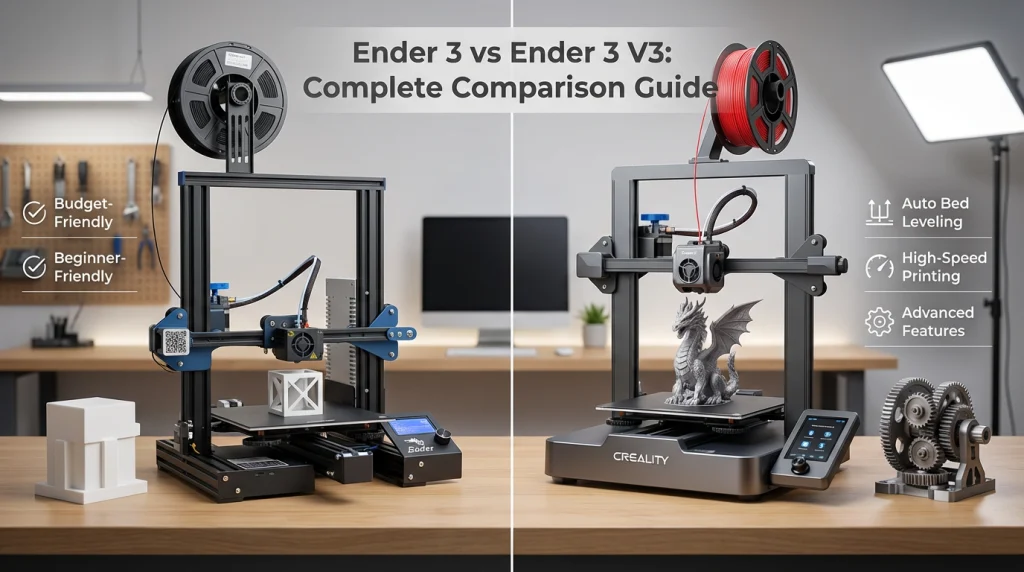
Pros and Cons of Ender 3
Pros and Cons of Ender 3 V3
Which One Should You Choose?
Choosing between the Ender 3 and the Ender 3 V3 depends on your specific needs, budget, and experience level. Here’s a breakdown to help you decide:
1. For Beginners or Budget-Conscious Users
If you’re new to 3D printing or working with a tight budget, the Ender 3 is a fantastic starting point. It’s affordable, reliable, and has a large community of users for support. While it may lack some advanced features, it’s perfect for learning the basics and experimenting with simple projects. You can always upgrade components later as you gain experience.
2. For Advanced Users or Professionals
For those with more experience or specific project requirements, the Ender 3 V3 is worth the investment. It offers faster print speeds, better precision, and advanced features like WiFi connectivity and Klipper firmware. These upgrades make it ideal for professionals or businesses needing high-quality, efficient production.
3. For DIY Enthusiasts
If you enjoy tinkering and customizing your printer, the Ender 3 is a great choice. Its open design and modularity allow for endless upgrades and modifications. You can enhance its performance over time, making it a rewarding project for hobbyists.
4. For Business or High-Volume Printing
The Ender 3 V3 is better suited for businesses or users who need to print frequently. Its faster speeds and improved motion system reduce production time, while its advanced firmware ensures consistent quality. The added convenience of wireless connectivity also streamlines workflow.
5. For Printing Complex Materials
If you plan to work with high-temperature or flexible materials, the Ender 3 V3 is the better option. Its upgraded hotend and direct drive extruder handle materials like ABS, PETG, and TPU with ease. The Ender 3, while capable, may require additional upgrades to achieve this level of performance.
Practical Advice
- Start Small: If you’re unsure about your long-term commitment to 3D printing, start with the Ender 3. It’s a low-risk investment.
- Think Long-Term: If you foresee scaling up your projects or need advanced features, the Ender 3 V3 offers better value over time.
- Consider Upgrades: The Ender 3 is highly customizable, but upgrades can add up. If you prefer an out-of-the-box solution, go for the Ender 3 V3.
- Evaluate Your Needs: For casual use, the Ender 3 is sufficient. For professional or business use, the Ender 3 V3 is a more efficient choice.
Both printers are excellent in their own right, but your decision should align with your goals and budget. Whether you’re a beginner or a seasoned pro, there’s an Ender model that’s perfect for you.
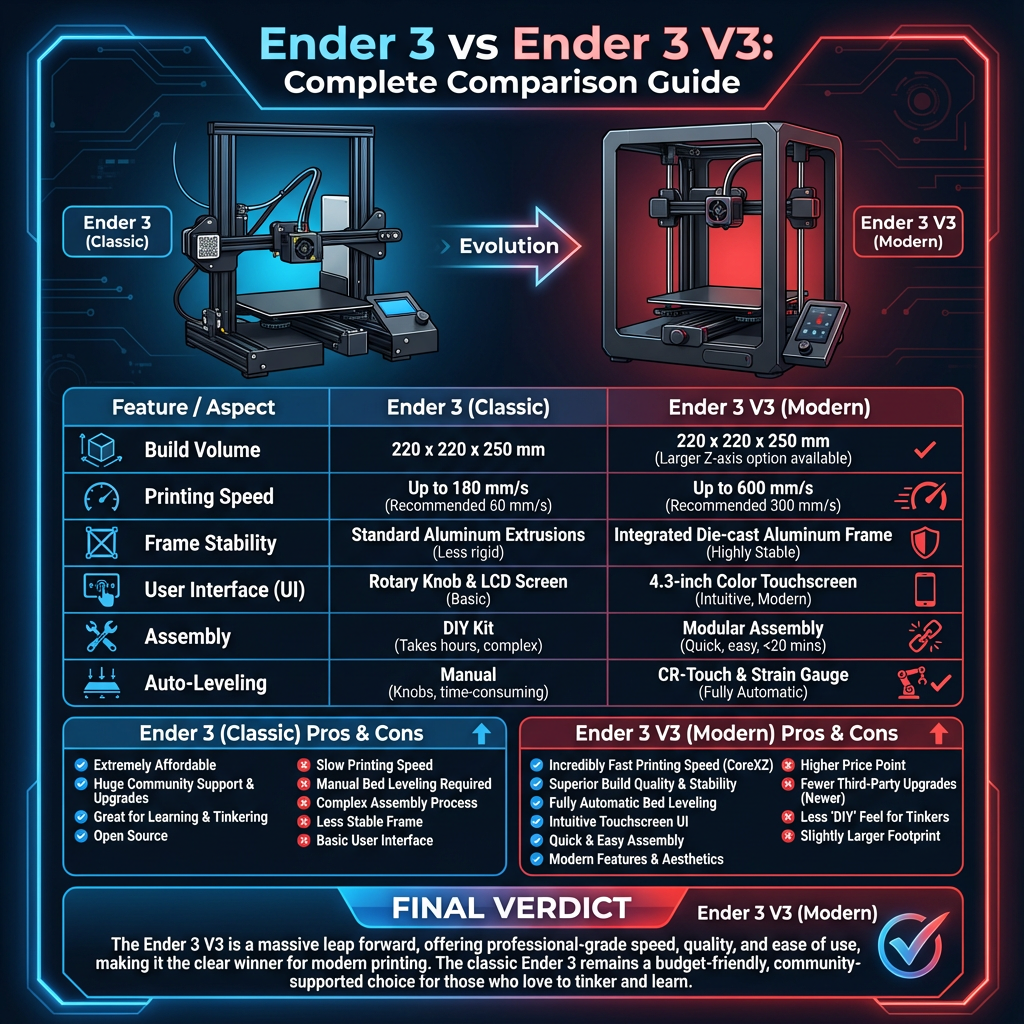
Summery
Choosing between the Ender 3 and the Ender 3 V3 depends on your specific needs and priorities. Both models offer excellent value, but they cater to different user profiles.
The Ender 3 is a reliable, budget-friendly option, perfect for beginners or those looking for a straightforward 3D printing experience. It’s a great starting point for DIY enthusiasts or hobbyists who want to explore 3D printing without breaking the bank.
On the other hand, the Ender 3 V3 is designed for users who demand more advanced features and faster performance. With its CoreXZ motion system, higher print speeds, and enhanced precision, it’s ideal for professionals or businesses that need efficiency and quality in their prints.
Before making your decision, consider your budget, experience level, and the types of projects you plan to undertake. If you’re starting, the Ender 3 might be all you need. But if you’re ready to invest in a more capable machine, the Ender 3 V3 is worth the extra cost.
Ready to take the next step? Explore these printers and find the one that best fits your needs. Check out our detailed buying guide or visit trusted retailers to make your purchase today!
Frequently Asked Questions (FAQs)
What are the main differences between the Ender 3 and Ender 3 V3?
The Ender 3 V3 is an upgraded version of the original Ender 3. It features faster print speeds, improved motion systems, and advanced firmware. The V3 also includes features such as Wi-Fi connectivity, a touchscreen interface, and enhanced print quality, making it more suitable for advanced users.
Is the Ender 3 V3 worth the extra cost compared to the Ender 3?
If you’re looking for faster printing, better precision, and modern features like WiFi and Klipper firmware, the Ender 3 V3 is worth the investment. However, for beginners or budget-conscious users, the original Ender 3 still offers excellent value.
Does the Ender 3 V3 support auto bed leveling?
Yes, the Ender 3 V3 includes an advanced strain gauge sensor for automatic bed leveling and Z-offset calibration. This feature simplifies the setup process and ensures consistent print quality.
How fast can the Ender 3 V3 print?
The Ender 3 V3 can reach speeds of up to 600 mm/s with 20,000 mm/s² acceleration. However, for optimal print quality, it’s recommended to use lower speeds.
Which printer is better for beginners?
The original Ender 3 or the Ender 3 V3 SE is more beginner-friendly due to its affordability and simpler features. The Ender 3 V3 is better suited for users with some experience or those looking for advanced capabilities.